Getting Started with Jinba App
Welcome to the future of vibe-coding.
Jinba (YC W26) is the interface where natural language meets execution. It bridges the gap between purely generative chat and deterministic, real-world actions. Jinba leverages the Model Context Protocol (MCP) which empowers you to vibe-code complex workflows, securely connecting LLMs to your production databases, cloud infrastructure, and local environments without context switching.
This guide unblocks your path to building autonomous flows that work as hard as you do.
The Interface: Built for Flow
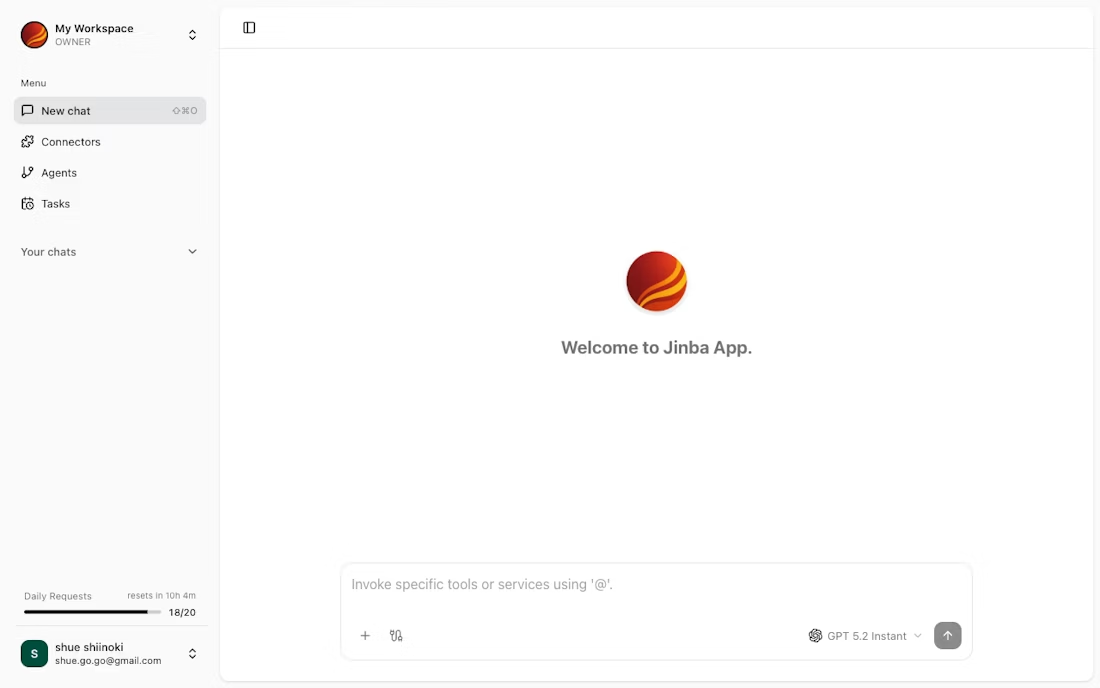
Jinba's UI is designed to disappear, letting you focus on the intent, not the implementation.
-
The Sidebar (Flow Control)
- Your command history. Access saved prompts, recent "vibes" (sessions), and favorite tools.
- One-click context switching. Jump between a "Debug Production" flow and a "Generate Marketing Assets" flow instantly.
-
The Execution Canvas (Chat + UI)
- Hybrid Interface. Start with chat. When Jinba needs structured input (e.g., API keys, deployment targets), it dynamically renders native UI forms right in the stream. No more JSON-wrangling in the chat box.
- Rich Previews. See Markdown reports, code diffs, and data tables rendered beautifully inline.
-
MCP Control Panel
- The Engine Room. Manage your MCP connections here. Connect to PostgreSQL, Slack, GitHub, or your local file system.
- Permissions Granularity. Control exactly what the AI can see and do.
Core Capabilities
1. Dynamic "Vibe-to-UI" Generation
Jinba doesn't just output text; it outputs tools. When your request requires precise parameters, Jinba instantly generates a React-based form on the fly.
- Problem: You ask to "Update the user's tier."
- Jinba's Solution: Instead of asking for a SQL query, it presents a dropdown menu with
Free,Pro, andEnterpriseoptions, validated against your schema.
2. Glass-Box Reasoning
Trust is earned through transparency. Jinba visualizes the AI's decision tree in real-time.
- See the thinking: Watch as the agent selects a tool, validates the input, and executes the command.
- Live Logs: Expand any step to see raw request/response objects for deep debugging.
3. Enterprise-Grade Safety
Empower non-engineers without breaking production.
- Human-in-the-Loop: Configure sensitive tools (like
DELETE FROM users) to always require a click-to-confirm. - Sandboxed Environments: All code execution happens in isolated containers.
Powering Up with MCP
The Model Context Protocol (MCP) is what makes Jinba "real." It is the standard for connecting AI models to your data.
Instead of building custom integrations for every tool, you simply point Jinba at an MCP Server.
Configuring Your First Connection
To connect Jinba to your infrastructure, you add a server entry to your configuration. Here is a production-ready example connecting to a PostgreSQL database and a GitHub repository:
{
  "mcpServers": {
    "production-db": {
      "command": "docker",
      "args": [
        "run", "--rm", "-i",
        "mcp/postgres",
        "postgres://user:pass@db.prod.internal:5432/main"
      ]
    },
    "github-integration": {
      "command": "npx",
      "args": ["-y", "@modelcontextprotocol/server-github"],
      "env": {
        "GITHUB_TOKEN": "${env:GITHUB_TOKEN}" // Securely injected
      }
    }
  }
}
By using MCP, Jinba decouples the Model (the brain) from the Context (your data). You can switch models (GPT-4o, Claude 3.5 Sonnet, etc.) without breaking your integrations.
Next Steps
You have the power. Now build the flow.
- Create Your First Vibe: A 5-minute tutorial to build a Jira-to-Slack automation.
- Master the MCP Protocol: Deep dive into creating your own custom MCP servers.